Showing posts with label JQUERY. Show all posts

Sunday, June 30, 2013

MVC4 with jquery-ui datepicker

Here's the steps, and they're very simple.  You only have to do it this way if you want to use the built-in bundling and minification, if not you can always use the exact same code you would use in an HTML page, but you would have to comment out the bundle generation code.


  • Create a new MVC4 project and Select the Internet template. Use all default options.
  • Edit the _Layout.cshtml in ~/Views/Shared and add these two lines after the jquery bundle at the bottom
  • @Scripts.Render("~/bundles/jqueryui")
  • @Styles.Render("~/Content/themes/base/css", "~/Content/css") -- NOTE Styles.Render, not Scripts.Render as in your code
  • Either edit the Index.cshtml and delete everything, or create a new Controller action and blank view.
  • Inside the view, add the following code, Press F5 and you're done!


Wednesday, October 10, 2012

jqGrid and ASP.NET MVC

I've been using jqGrid a lot over last year. During this time I have created many helper classes for it. Recently I decided to put all those classes together, clean up, rewrite and publish for the community.
I made helper available as part of my Lib.Web.Mvc library, and you can download it here (source code included), or go for the NuGet package.
 
 
Now let me show you simple usage example. We will need a model class for our grid:
?
1
2
3
4
5
6
7
8
9
10
11
12
13
14
15
16
17
18
19
20
21
22
23
24
25
26
27
28
29
30
31
32
33
34
35
36
37
38
39
40
41
42
public class ProductViewModel
{
  #region Properties
  public int Id { get; set; }
 
  public string Name { get; set; }
 
  [JqGridColumnSortingName("SupplierId")]
  public string Supplier { get; set; }
 
  [JqGridColumnSortingName("CategoryId")]
  public string Category { get; set; }
 
  [DisplayName("Quantity Per Unit")]
  [JqGridColumnAlign(JqGridColumnAligns.Center)]
  public string QuantityPerUnit { get; set; }
 
  [DisplayName("Unit Price")]
  [JqGridColumnAlign(JqGridColumnAligns.Center)]
  public decimal? UnitPrice { get; set; }
 
  [DisplayName("Units In Stock")]
  [JqGridColumnAlign(JqGridColumnAligns.Center)]
  public short? UnitsInStock { get; set; }
  #endregion
 
  #region Constructor
  public ProductViewModel()
  { }
 
  public ProductViewModel(Product product)
  {
    this.Id = product.Id;
    this.Name = product.Name;
    this.Supplier = product.Supplier.Name;
    this.Category = product.Category.Name;
    this.QuantityPerUnit = product.QuantityPerUnit;
    this.UnitPrice = product.UnitPrice;
    this.UnitsInStock = product.UnitsInStock;
  }
  #endregion
}
 
Following standard DataAnnotations attributes are supported:
  • DisplayName - This will set the name for the column (default is property name).
  • DisplayFormat - Value set for NullDisplayText will be used as cell value if property value will be null. Value set for DataFormatString will be used for formatting property value (on server side).
  • HiddenInput - This will set JqGridColumnModel.Hidden to true.
  • Range - Value set for Maximum will be used for EditRules.MaxValue of editable column and value set Minimum for will be used for EditRules.MinValue.
  • Required - This will set EditRules.Required to true for editable column.
  • ScaffoldColumn - If set Scaffold to false, there will be no column created for property with this attribute.
  • StringLength - Value set for MaximumLength will be used for EditOptions.MaximumLength of editable column.

  Additionaly the helper support those custom attributes (from Lib.Web.Mvc.JQuery.JqGrid.DataAnnotations namespace):
  • JqGridColumnLayout - This will set the layout attributes for the column (alignment, initial width etc.).
  • JqGridColumnSortable - This will set the sorting options for the column (by default every column is sortable with property name as sorting name).
  • JqGridColumnFormatter - This will set the predefined (with options) or custom formatter for the column.
  • JqGridColumnEditable - This will set the edit options for the column.
  • JqGridColumnSearchable - This will set the search options for the column.
When our model class is done, we can start creating the view. First we need to include some CSS and JavaScript files:
?
1
2
3
4
5
<link href="@Url.Content("~/Content/themes/base/jquery-ui.css")" rel="stylesheet" type="text/css" />
<link href="@Url.Content("~/Content/jqGrid/jquery-ui-jqgrid.css")" rel="stylesheet" type="text/css" />
<script src="@Url.Content("~/Scripts/jquery-1.4.4.min.js")" type="text/javascript"></script>
<script src="@Url.Content("~/Scripts/jquery.jqGrid.locale-en-3.8.2.js")" type="text/javascript"></script>
<script src="@Url.Content("~/Scripts/jquery.jqGrid-3.8.2.min.js")" type="text/javascript"></script>
 
Then we can instantiate the helper and set desired options:
?
1
2
3
4
5
6
7
8
9
10
11
12
@{
  var grid = new Lib.Web.Mvc.JQuery.JqGrid.JqGridHelper<jqGrid.Models.ProductViewModel>("products",
    dataType: Lib.Web.Mvc.JQuery.JqGrid.JqGridDataTypes.Json,
    methodType: Lib.Web.Mvc.JQuery.JqGrid.JqGridMethodTypes.Post,
    pager: true,
    rowsNumber: 10,
    sortingName: "Id",
    sortingOrder: Lib.Web.Mvc.JQuery.JqGrid.JqGridSortingOrders.Asc,
    url: Url.Action("Products"),
    viewRecords: true
  );
}

 
This instance can be used for rendering HTML and JavaScript required by jqGrid:

?
1
2
3
4
5
6
7
@grid.GetHtml()
...
<script type="text/javascript">
  $(document).ready(function () {
    @grid.GetJavaScript()
  });
</script>

 
All we have to do now is creating an action method, which will provide data for our grid:
?
1
2
3
4
5
6
7
8
9
10
11
12
13
14
15
16
[AcceptVerbs(HttpVerbs.Post)]
public ActionResult Products(JqGridRequest request)
{
  int totalRecordsCount = _productsRepository.GetCount();
 
  JqGridResponse response = new JqGridResponse()
  {
    TotalPagesCount = (int)Math.Ceiling((float)totalRecordsCount / (float)request.RecordsCount),
    PageIndex = request.PageIndex,
    TotalRecordsCount = totalRecordsCount
  };
  response.Records.AddRange(from product in _productsRepository.FindRange(String.Format("{0} {1}", request.SortingName, request.SortingOrder), request.PageIndex * request.RecordsCount, request.RecordsCount)
                            select new JqGridRecord<ProductViewModel>(Convert.ToString(product.Id), new ProductViewModel(product)));
 
  return new JqGridJsonResult() { Data= response };
}

 
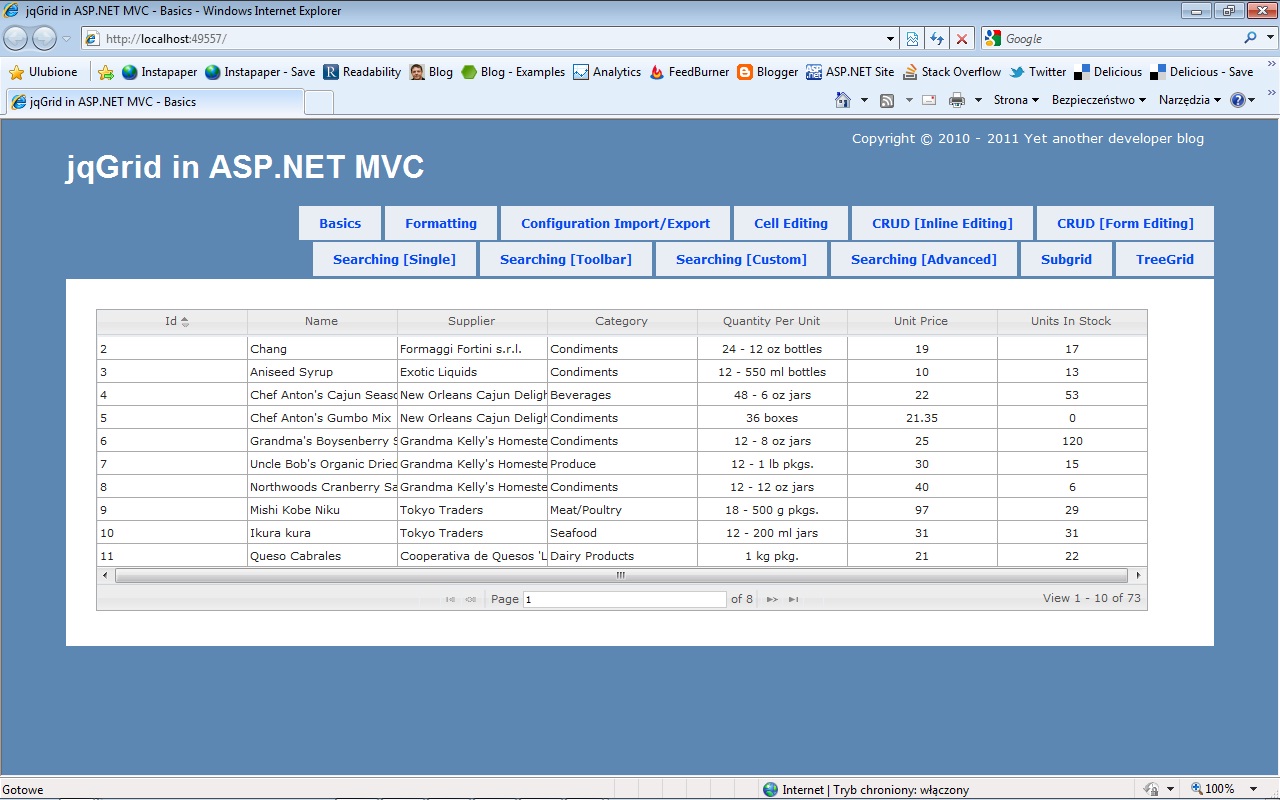
When you run it, you should see something similar to this:


You can download a sample project for this helper, which contains following examples:
  • Basics & Formatting
  • Configuration Import/Export
  • Cell Editing
  • CRUD - Inline Editing
  • CRUD - Form Editing
  • Searching - Single
  • Searching - Toolbar
  • Searching - Custom
  • Searching - Advanced
  • Subgrid
  • TreeGrid
The helper doesn't support all the functionality of jqGrid, it's just a compilation of what I've been using. There is also no roadmap for it at the moment.
Refrences: http://tpeczek.blogspot.in/2011/03/jqgrid-and-aspnet-mvc-strongly-typed.html

Friday, July 13, 2012

Create a mobile website with jQuery Mobile

Tuesday, January 3, 2012

Jquery Selector Editor

Tuesday, December 6, 2011

jQuery Selectors


jQuery Element Selectors

jQuery uses CSS selectors to select HTML elements.
$("p") selects all <p> elements.
$("p.intro") selects all <p> elements with class="intro".
$("p#demo") selects all <p> elements with id="demo".

jQuery Attribute Selectors

jQuery uses XPath expressions to select elements with given attributes.
$("[href]") select all elements with an href attribute.
$("[href='#']") select all elements with an href value equal to "#".
$("[href!='#']") select all elements with an href attribute NOT equal to "#".
$("[href$='.jpg']") select all elements with an href attribute that ends with ".jpg".


jQuery CSS Selectors

jQuery CSS selectors can be used to change CSS properties for HTML elements.
The following example changes the background-color of all p elements to yellow:


 $("p").css("background-color","yellow");

Some More Examples

Syntax Description
$(this) Current HTML element
$("p") All <p> elements
$("p.intro") All <p> elements with class="intro"
$("p#intro") All <p> elements with id="intro"
$("p#intro:first") The first <p> element with id="intro"
$(".intro") All elements with class="intro"
$("#intro") The first element with id="intro"
$("ul li:first") The first <li> element of each <ul>
$("[href$='.jpg']") All elements with an href attribute that ends with ".jpg"
$("div#intro .head") All elements with class="head" inside a <div> element with id="intro"